
You can hide calendar buttons and controls on your calendar by following the below instructions.
Login to Calendar > Go to Admin Menu > Options > Expert Options Tab > Under "Hide Buttons and Controls" check the appropriate settings > [Save] Changes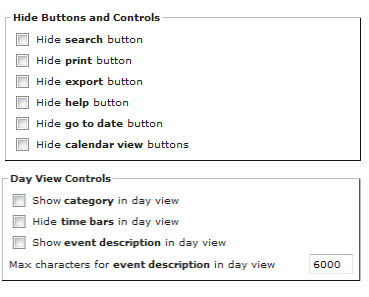
Alternately, you can remove calendar buttons by inserting a specific argument into calendar url a webpage. In this case, the buttons will only be removed from display when you access the calendar using the url that contains the special argument(s.)
Here is a complete list of the buttons that you can remove from your calendar view .
Main Calendar Buttons:
&nosearch=1 - to not show the search button
&noprint=1 - to not show print button
&noexport=1 - to not show export button
&nohelp=1 - to not show help button
&nogotodate=1 - to not show go to date button
&noviewsel=1 - to not show the view select button
&nolog=1 - to not show login button
&nocatsel=1 - to not show category selection list
Arguments Specific to the Day View:
&showcatday=1 - to show category in day view
&nobarsday=1 - to not show time bars in day view
&showdescday=1 - to show description in day view
&desclenday=nnnn - length of description in day view (requires &showdescday=1)
Here is an example url that hides the login, search, print, export, and help buttons. Be sure to insert your calendar identifier into the example link:
http://www.calendarwiz.com/calendars/calendar.php?crd=calendaridentifier&nolog=1&nocatsel=1&nosearch=1&noprint=1&noexport=1&nohelp=1
Please note that you can force a button to appear by changing the argument value from a '1' to a '0' - for example the following link below would force the login button to appear:
http://www.calendarwiz.com/calendars/calendar.php?crd=calendaridentifier&nolog=0